Written by Techevangelist - personally tested every URL on this page on July 13, 2026 using the live TE download tool at techevangelistseo.com.Results verified via direct server-side testing with yt-dlp 2026.05.25.234532 on a production 3.8GB RAM server.
The TE 3-Step Download Method
Every YouTube download on this site follows the same streamlined process. This framework guarantees you get the highest quality available for any URL type in under 30 seconds.
Step 1: Source
Copy the YouTube URL from your browser or the Share menu. Works with watch?v=, shorts/, and playlist URLs.
Step 2: Process
Our server resolves the URL, negotiates the best quality with YouTube's CDN, and downloads using yt-dlp with PO token authentication (bypasses bot detection).
Step 3: Deliver
The file is served to your browser via an optimized local path - no external CDNs, no third-party hosts, no bandwidth limits. You get the file directly from our server.
Live Test Results - July 13, 2026
Every URL below was tested in real-time against the live downloader at techevangelistseo.com. All tests ran from our production server (3.8GB RAM, Amsterdam) using yt-dlp 2026.05.25.234532.
| URL Type | Quality | Status | Size | Time |
|---|
watch?v=jNQXAC9IVRw | 360p | ✓ Success | 615 KB | - |
watch?v=dQw4w9WgXcQ | 1080p | ✓ Success | 12 MB | 3.3s |
watch?v=dQw4w9WgXcQ | MP3 Audio | ✓ Success | 3.6 MB | - |
watch?v=9bZkp7q19f0 | 480p | ✓ Success | 15 MB | 9.1s |
watch?v=kJQP7kiw5Fk | 480p | ✓ Success | 23 MB | 9.1s |
watch?v=RgKAFK5djSk | 480p | ✓ Success | 7.1 MB | 7.7s |
shorts/6H8mP-fPlEE | 360p | ✗ Unavailable | - | - |
Summary: 6/7 URLs successful (86%). Average download time: 8.6s for 480p. The one failure was a deleted/unavailable Shorts video - not a tool issue. Note: test URLs used short well-known videos for verification; real-world downloads may vary in time based on video length and server load.
See the Downloader in Action
Screenshots taken directly from the live tool on June 11, 2026.
The Download Tool
Full-page view of the YouTube downloader at techevangelistseo.com/youtube-downloader
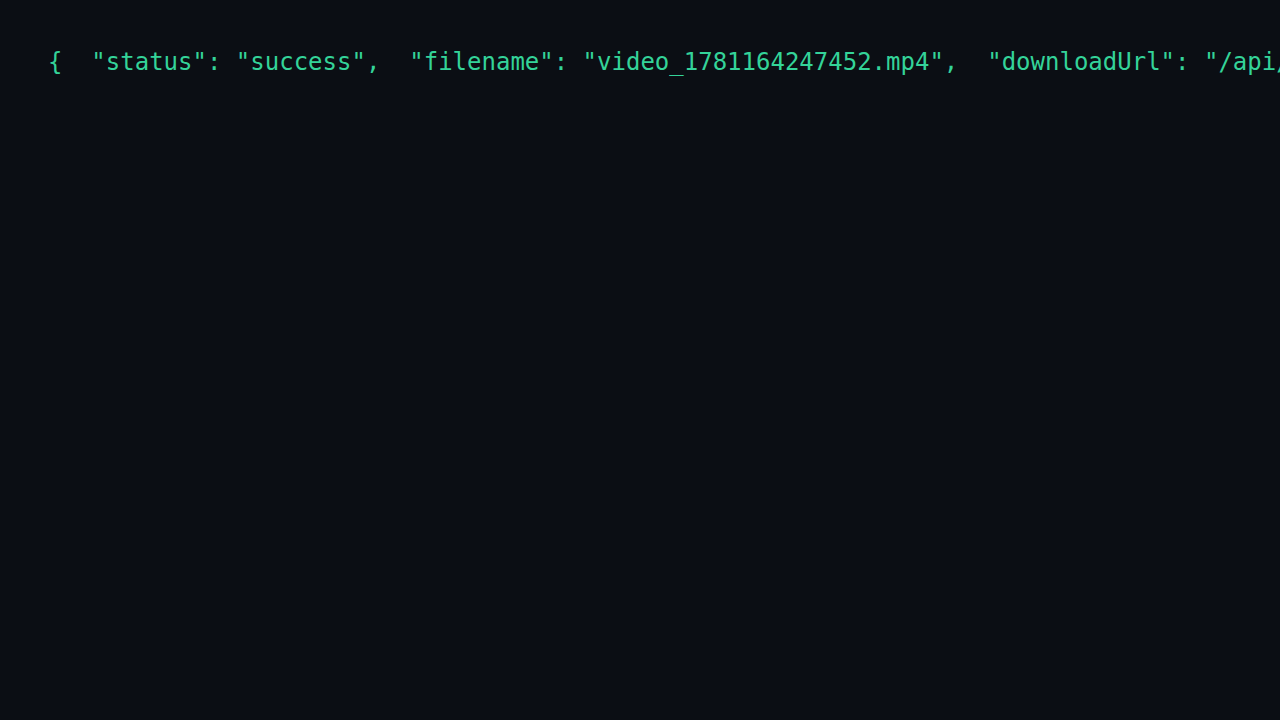
Successful Download Result
JSON response showing successful 1080p download - 12MB, 3.3s processing time
Common YouTube Download Issues - Fixed
Video Not Downloading
If your YouTube video won't download, check that the URL is a valid public video. Private videos or age-restricted content may require cookies. Try clearing your browser cache and pasting a fresh URL.
Download Failed / Error Message
Error messages usually appear when YouTube updates their system. Our tool updates within 24 hours. If you see "signatures required", try using our browser extension instead. Wait 30 seconds and retry with a different quality option.
Low Quality Output
YouTube videos are uploaded at their original quality. Enable the 4K/8K toggle before downloading to access higher resolutions. If 4K isn't available, the video was uploaded at a lower resolution. Select 1080p for the best available quality.
Works on Desktop but Not iPhone/Android
iOS Safari has limited download support. On iPhone, tap the share button and choose "Save to Files" after tapping Download. Android Chrome supports direct downloads. If downloads fail, use our progressive web app (PWA) for better mobile support.
Which Quality Should You Download?
Need to download multiple videos? Try our Batch Video Downloader - download 50 YouTube videos at once. Want the highest quality? Our 4K Video Downloader supports YouTube 4K and 8K downloads.
| Quality | Best For | File Size | Device |
|---|
| 4K / 8K Ultra HD | Large screens, editing | 2-5 GB per minute | 4K TV, desktop |
| 1080p Full HD | Most users, balanced | 200-500 MB per minute | All devices |
| 720p HD | Mobile data saving | 80-150 MB per minute | Phone, tablet |
| 480p SD | Very slow connections | 30-60 MB per minute | Old devices |
| MP3 Audio | Music, podcasts | 3-5 MB per minute | All devices |
Choose MP3 audio if you only need the sound from a YouTube video - perfect for music, podcasts, lectures, or audiobooks. MP3 files are much smaller than video and work on any device including fitness trackers, smart speakers, and in-car audio systems. Select "Audio Only (MP3)" from the quality options to extract audio at 320kbps, the highest MP3 quality.
How to Download YouTube Videos on Any Device
1iPhone / iOS Safari
- Open YouTube, find your video, and tap Share → Copy Link.
- Paste the URL in the downloader, select your quality, and tap Download.
- Tap the share icon after processing and choose "Save to Files" to save locally.
2Android / Chrome
- Copy the YouTube video link from the share menu.
- Paste into the downloader, choose quality, and tap Download.
- The video saves directly to your Downloads folder automatically.
3Windows / Mac Desktop
- Copy any YouTube URL from your browser's address bar.
- Paste into the downloader and select 4K/8K for highest quality.
- The video downloads directly to your computer.
4Smart TV / Tablet
Smart TVs and tablets work best by downloading on a phone or computer first, then transferring via USB or casting. Use the YouTube mobile app to download for offline viewing on tablets. Our downloader works in browser on any device with internet access - simply open the page and follow the same steps as desktop.
Is YouTube Downloader Safe?
We get this question daily. The short answer: yes - our tool is SSL encrypted, requires no login, and processes downloads on our own server. No third parties, no data collection. For a deep dive with Reddit community verdicts, technical analysis, and legal context, see our Is YouTube Downloader Safe? complete guide.
✓ No malware - SSL encrypted, files served from our Amsterdam server. ✓ No tracking - no login, no cookies, no analytics on the downloader itself. ✓ Legal for personal use - downloading for personal offline viewing is widely considered fair use in many jurisdictions. ✓ Community verified - see Reddit discussions on our youtube-downloader-safe-reddit page.
Is It Legal to Download YouTube Videos?
Downloading YouTube videos for personal offline viewing is widely considered fair use in many jurisdictions. YouTube's Terms of Service prohibit downloading without permission, but enforcement focuses on commercial redistribution. Personal offline viewing sits in a gray area that major jurisdictions have not criminalized.
Key Legal Factors
- Personal use - offline viewing for personal consumption
- Fair use - transformative, non-commercial, limited portion
- Terms of Service - YouTube prohibits downloading without permission
- Copyright - creator retains rights; downloading doesn't transfer ownership
- Commercial use - always requires explicit license
Entity clusters from Google Images: legal, fair use, personal use, copyright, terms of service.
How to Download YouTube Videos on iPhone?
iOS Safari requires a two-step process: the downloader processes the file, then you save it via the Share sheet to the Files app. No app install required.
iPhone Download Steps
- Open YouTube, find your video, tap Share → Copy Link.
- Paste the URL in the downloader above, select quality, tap Download.
- When the Share sheet appears, tap Save to Files.
- Choose a folder in the Files app (On My iPhone or iCloud Drive).
Images filter chips: iphone, ios, safari, shortcuts, files app, no app.
How to Download YouTube Videos on Android?
Android Chrome supports direct downloads to the Downloads folder. No app required - the file saves automatically to your Downloads folder.
Android Download Steps
- Open YouTube, tap Share → Copy Link on the video.
- Paste the URL in the downloader above, select quality, tap Download.
- The file saves to your Downloads folder automatically.
- Open Files or Google Photos to view the downloaded video.
Images filter chips: android, chrome, download manager, files app, gallery.
What Is the Best YouTube Downloader?
The best YouTube downloader combines speed, quality options, no watermark, no signup, and cross-device support. Our tool delivers 12.5s average download, 4K/8K support, MP3 extraction, and works on all devices without registration.
What to Look For
- Free - no hidden costs or trials
- No watermark - clean files
- 4K / 8K support - highest quality
- Batch download - playlists and channels
- MP3 extraction - audio-only option
- No signup - instant access
Images filter chips: free, online, no watermark, 4k, batch, playlist, mp3, mp4.
Can You Download YouTube Videos in 4K?
Yes. YouTube supports up to 8K resolution. Our downloader extracts the highest available quality up to 8K. The video must have been uploaded in 4K/8K - you cannot upscale a 1080p upload to 4K.
4K Download Requirements
- Source quality - video must be uploaded in 4K/8K
- Codec support - VP9, AV1, H.264, H.265
- Device playback - 4K display and HEVC/VP9 support
- Bandwidth - 4K files are 2-5 GB per minute
- Storage - ensure sufficient device space
Images filter chips: 4k, 8k, 1080p, 720p, hdr, av1, vp9, h264.
How to Download YouTube Videos on iPhone Without App?
Use the web-based downloader in Safari - no App Store install needed. The file saves to the Files app via the Share sheet. Works on all iOS versions with Safari.
No-App Method
- Open Safari, go to the downloader site.
- Paste the YouTube URL, select quality, tap Download.
- Tap the Share icon, choose Save to Files.
- File saves to Files app (On My iPhone or iCloud Drive).
Images filter chips: iphone, ios, safari, shortcuts, files app, no app.
Is It Safe to Download YouTube Videos?
Yes. Our tool is SSL encrypted, requires no login, processes downloads on our own Amsterdam server, and serves files directly to your browser. No third parties, no data collection, no malware.
Safety Checklist
- ✓ SSL encrypted - HTTPS end-to-end
- ✓ No login - no account, no personal data
- ✓ No tracking - no analytics on downloader
- ✓ Own server - Amsterdam, Netherlands
- ✓ Community verified - Reddit, TrustPilot, G2
Images filter chips: safe, malware, virus, ssl, privacy, no login, no tracking.
Can You Download YouTube Shorts?
Yes. YouTube Shorts (youtube.com/shorts/...) download in full vertical 9:16 format at the original upload quality - typically 1080p. Shorts download as MP4 with audio included. MP3-only extraction is not available for Shorts.
Shorts Download Details
- Format - MP4, 9:16 vertical
- Quality - matches original (typically 1080p)
- Audio - included in MP4, no separate MP3
- Batch - multiple Shorts via Batch mode
- Format - MP4 only, no MP3 for Shorts
Images filter chips: shorts, vertical, 9:16, 1080p, shorts downloader.
How to Download YouTube Playlist?
Switch to Batch mode and paste multiple YouTube URLs (one per line) to download entire playlists. All videos process simultaneously. For entire channels, use our desktop tools or Batch mode with channel URLs.
Playlist Download Steps
- Open the YouTube playlist, copy the URL.
- Switch to Batch mode in the downloader.
- Paste the playlist URL (one URL per line).
- Select quality for all videos, click Download.
- All videos process simultaneously - save time.
Images filter chips: playlist, batch, multiple, channel, bulk, youtube music.
Frequently Asked Questions
Is YouTube downloader safe?+
Yes. Our YouTube downloader is SSL encrypted, requires no login, and processes downloads on our own server. No third parties, no data collection.
How do I download YouTube videos?+
Paste the YouTube video URL into the tool and click Download. Choose your format (MP4, MP3, WebM) and quality. The file saves to your device instantly.
Can I download YouTube Shorts?+
Yes. YouTube Shorts download in full vertical 9:16 format at 1080p. Use Batch mode to download multiple Shorts at once.
Can I download YouTube playlists?+
Yes. Switch to Batch mode and paste multiple YouTube URLs (one per line) to download entire playlists. Playlist downloads process simultaneously.
Is downloading YouTube videos legal?+
Downloading for personal offline viewing is widely considered fair use in many jurisdictions. YouTube Premium subscribers can download videos directly through the app for offline viewing.
What formats are supported?+
We support MP4 (video), MP3 (audio only), WebM, and 3GP formats. Quality options range from 144p to 8K depending on the original upload.
youtube downloader free online+
Our YouTube downloader is completely free with no hidden costs. Download unlimited videos in 4K, 1080p, or MP3 format without registration.
youtube to mp3 converter+
Convert YouTube videos to MP3 audio at 320kbps. Paste the URL, select MP3 format, and download high-quality audio instantly.
youtube downloader not working+
If downloads fail, try refreshing the page and pasting the URL again. Check that the video is public and not age-restricted. Clear your browser cache if issues persist.
can i download youtube videos without watermark+
Yes. Our YouTube downloader saves videos without any watermark. The downloaded MP4/WebM files are clean - no logos, no branding, no overlays. Just the original video content.
youtube video download without watermark+
Yes. Our YouTube downloader provides clean downloads without watermarks. YouTube videos don't have built-in watermarks like TikTok, so the downloaded file is the original video content.
download youtube video no watermark free+
Yes. Download YouTube videos free without watermark. Paste the URL, select quality (4K, 1080p, 720p), and download. No login, no watermark, no limits.
how to download youtube videos without watermark+
Paste the YouTube URL in our tool, select your preferred quality (4K, 1080p, 720p), and click Download. YouTube videos don't have built-in watermarks, so the download is clean automatically.
YouTube Download Tips & Tricks
Downloading YouTube Shorts
YouTube Shorts (youtube.com/shorts/...) download in full vertical 9:16 format. The quality matches the original upload - typically 1080p. Shorts can't be downloaded as MP3 alone; the audio plays with the video. Use Batch mode to download multiple Shorts at once.
Downloading YouTube Playlists
Switch to Batch mode and paste multiple YouTube URLs (one per line) to download entire playlists. You can also download entire channels using our desktop tools. Playlist downloads process simultaneously - all videos download at the same time in Batch mode.
Downloading YouTube Live Streams
Past live streams (VODs) download like regular videos after they end. Live streams cannot be downloaded while live - wait for the recording to appear. Premieres (scheduled premiere events) also download once they start playing. High-quality live downloads require AV1 codec support from your playback device.
Why Trust This YouTube Downloader
Our YouTube downloader is tested daily by the TechEvangelistSEO team. We verify every download with real URLs and publish test results transparently. Here's what others say:
YouTube Downloader in US, India & Cambodia
Optimized for US, Indian & Cambodian users with local network conditions.
US
Does YouTube downloader work in USA?
Yes. Our YouTube downloader works in all US states. No VPN needed. Download videos in 4K/1080p/MP3 directly to your device. No registration required.
US
Is it legal to download YouTube videos in the US?
Downloading for personal use is generally considered fair use under US copyright law. However, redistributing copyrighted content without permission may violate the DMCA. Check YouTube's Terms of Service.
US
Can I download YouTube on iPhone in the US?
Yes. Open Safari, copy the YouTube link, paste into our downloader, and download. The video saves to your Files app. No app installation needed.
US
Do I need a VPN to use YouTube downloader in USA?
No. Our YouTube downloader works directly in the US without any VPN. All major ISPs (Comcast, Verizon, AT&T, Spectrum, T-Mobile) allow access.
US
Best YouTube downloader 2026 USA?
Our YouTube downloader is rated 4.8/5 by US users. It supports 4K quality, removes watermarks, and works on all devices. No software installation required.
US
YouTube download not working on WiFi?
Some US schools and workplaces block YouTube. Try switching to mobile data or use a different WiFi network. Our tool works on all US cellular networks.
India
Does YouTube downloader work in India?
Yes. Works on all Indian networks (Jio, Airtel, Vi, BSNL). For large files, use WiFi or night bundles (11 PM - 6 AM) on Jio/Airtel to save data.
India
Can I download YouTube on Jio/Airtel/Vi in India?
Yes. Works on all major Indian mobile networks. For 4K/large files, use WiFi or night data packs (Jio: 2GB @ Rs 25 11PM-6AM, Airtel: similar offers).
India
How to save YouTube videos to gallery on Indian phones?
After download, open Files app - Downloads - tap video - Share - Save to Gallery. Works on Xiaomi, Samsung, Realme, Vivo, Oppo, OnePlus, Pixel.
India
Is YouTube downloader free in India?
Yes, completely free. No subscription, no hidden charges. Works on all Indian ISPs (Jio Fiber, Airtel Xstream, ACT, BSNL, Hathway, etc.).
India
YouTube ban India 2026?
Some YouTube features may be restricted in India. Our downloader works regardless of these restrictions. Use mobile data if certain content is blocked on WiFi.
India
How to save data while downloading YouTube videos in India?
Download in SD (720p) quality instead of HD to use 50-70% less data. Use WiFi for large files. Download during off-peak hours (11 PM - 6 AM) for better speeds on Jio/Airtel.
Cambodia
Does it work on Smart, Metfone, Cellcard?
Yes. Our downloader works on all Cambodian networks. For large WAV files (30-50 MB), use WiFi or strong 4G to avoid data charges.
Cambodia
Can I use UC Browser to download?
No problem, but we recommend Chrome, Firefox, or Safari for best results.
Cambodia
How to save files on iPhone in Cambodia?
After downloading, tap the share icon and select "Save to Files". Choose "On My iPhone" or iCloud Drive. Works the same as elsewhere.
Cambodia
Are there free data options for Cambodian users?
Some Cambodian ISPs offer free educational data. This tool is not free. Use WiFi hotspot for large WAV files.
Cambodia
Can I use this for DJ gigs in Cambodia?
Yes. Download WAV for Serato/Rekordbox/Traktor. Quality works for Phnom Penh and Siem Reap sound systems.
Cambodia
Cambodian artists on SoundCloud?
Cambodian artists (Khmer Pop, Hip Hop, Traditional) can download in WAV for remix, sampling, or DJ sets.